Screenshot update
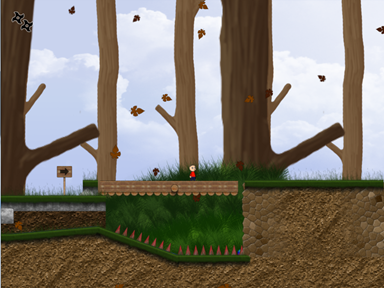
August 16th, 2010Progress! Here is a screenshot of the game with some decent (but still very WIP) graphics:
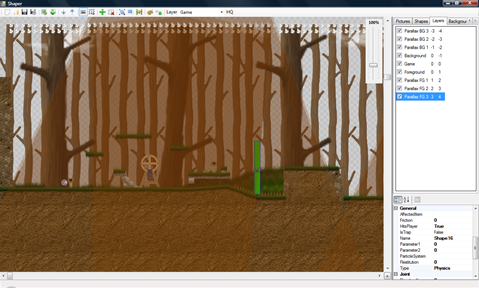
And here is the same level inside the editor:
Progress! Here is a screenshot of the game with some decent (but still very WIP) graphics:
And here is the same level inside the editor:
Progress! Here is a video showing parallax scrolling in the game:
I’ve been blog-lazy about the game, so here is a small recap of what’s been going on on my screen lately:
Milestone #0 was getting something on the screen:
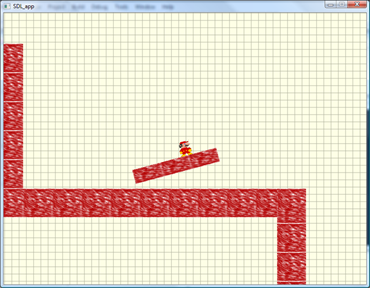
Milestone #1: level loading, animated coins and traps, movable objects
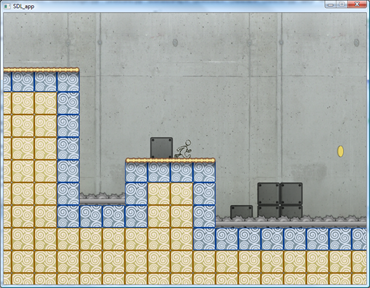
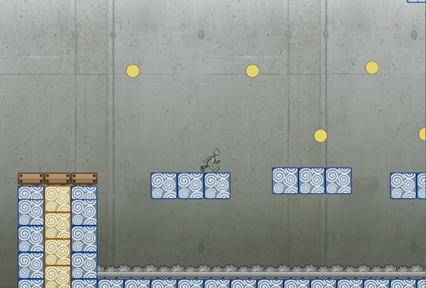
Milestone #2: rotating platforms, engines and vehicles:
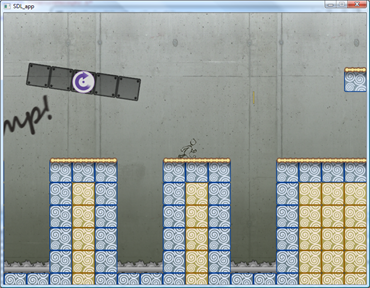
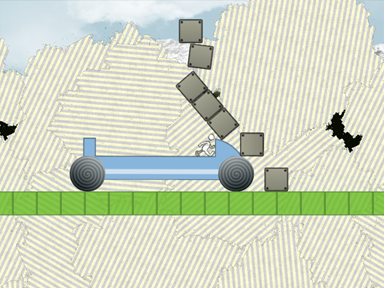
Milestone #3 is buttons and triggers. Since a single picture wouldn’t explain how they work well enough, what about a short video? I also added a small vehicles demonstration at the end because, well, they are just cool 🙂
When designing websites, I usually write multiple stylesheets for multiple parts of the website. For example, for gljakal.com I had 5 different stylesheets:
@import url("header.css");
@import url("sidebars.css");
@import url("content.css");
@import url("footer.css");
On more complex projects, I usually have even more stylesheets. One thing I am usually constant about however is having a generic theme.css or style.css that includes the other files. This is convenient because in my HTML pages I just have to link only one stylesheet file.
This technique works really well when testing the website on my local machine, however in production it has the downside of generating multiple requests on the client.
To address this problem, I wrote a small command-line program that would follow @import instructions and merge the imported files in the main one. It’s called CssCombine.
The code (in c#) is merely 48 lines long:
using System;
using System.Collections.Generic;
using System.Text;
using System.Text.RegularExpressions;

namespace CssCombine
{
    class Program
    {
        static void Combine(string parFileName, StringBuilder parOutput)
        {
            string[] lines = System.IO.File.ReadAllLines(parFileName);
            foreach (string s in lines)
            {
                if (s.Trim() != "")
                {
                    Regex rgx = new Regex(@"@import\s+url\s*\((.*)\);", RegexOptions.IgnoreCase | RegexOptions.CultureInvariant);
                    string[] sx = rgx.Split(s);
                    if (sx.Length > 1)
                    {
                        string sFile = sx[1].Replace("\"", "").Replace("'", "");
                        sFile = System.IO.Path.Combine(System.IO.Path.GetDirectoryName(parFileName), sFile);
                        Combine(sFile, parOutput);
                    }
                    else
                    {
                        parOutput.AppendLine(s.Trim());
                    }
                }
            }
        }

        static void Main(string[] args)
        {
            if (args.Length != 2)
            {
                Console.WriteLine("Usage: CssCombine [input.css] [output.css]");
            }
            else
            {
                string input = args[0];
                string output = args[1];
                StringBuilder sbOutput = new StringBuilder();
                Combine(input, sbOutput);
                System.IO.File.WriteAllText(output, sbOutput.ToString());
            }
        }
    }
}
Or you can download the compiled program here.
Another optimization would be to minify the resulting file. I use Yahoo’s YUI Compressor for that.
gljakal’s WAYD is the new software that helps you keep track of the time you spend in front of your computer. It does so in two ways:
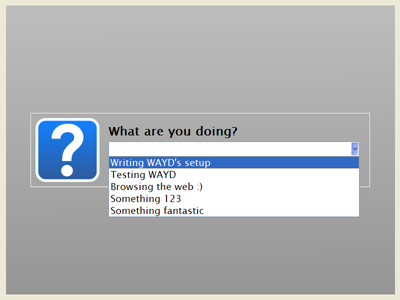
When you are ready to review your workdays, WAYD’s log viewer can show you your answers or the programs you were using in the specified time period. The log can also be exported to CSV files that you can open with Microsoft Excel® or OpenOffice Calc.
I think that WAYD can be really useful to professionals and freelancers that need to keep an eye on their time. For example, it can be especially useful when you need to determine how much time you worked for a customer last month or last week.
It also requires no discipline or effort on your part: instead of compiling a daily review of your work and storing it in some excel file somewhere in your documents folder, you are forced to report what you are working on every set amount of time (by default it’s every 30 minutes).
So, what are you waiting for? Head over to the download page to start tracking your time!
Instead of the usual combination of c#/.net framework, I used C++ and the Qt Framework to develop WAYD. I also used Qt Creator as a development environment.
I chose Qt because it has two very important features: first, it’s a multiplatform toolkit, meaning that I could easily port WAYD to MAC and Linux. Second, I can package the Qt library files directly with my application, so users don’t have to install them separately. This wasn’t the case with Clock (that required the VB6 library files) or ToDo (that required users to download and install the .net framework v1.1). One added benefit is that writing WAYD in C++ instead of C# lowered its memory footprint consistently.
I have to say that working with Qt and Qt Creator was a very pleasant experience.
The Qt framework has classes for almost everything, from window management (obviously) to database to date/time formatting.
Qt Creator is a well-thought and easy to use IDE. I’m used to Visual Studio and I had no difficulty at all with it.
While having lua scripts as level files is very flexible and “hackable”, it’s really difficult to “see” the level just by looking at a series of instructions.
At first, I used Inkscape, the open source vector drawing program, to create my levels.
It seemed like a perfectly good idea: Just like my game engine, Inkscape uses shapes to define the drawing. Also, since SVG files are basically XML files, any XML loader can be used to read the content of the drawing and extrapolate a game level script.
The real benefit was, however, that I didn’t need to write a level editor, but just a simple program that converts .svg files in lua scripts. I estimated that writing a converter instead of a level editor would save me a lot of time.
I estimated wrong 🙂
The problems I had with this approach were many, but here are the best ones:
In the end, frustrated by my poor choice, I decided to finally write a level editor.
It took me just a couple of evenings to create a decent c# application that does exactly what I want:
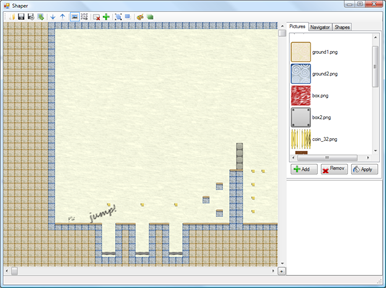
One of the best features is the ability to import the bitmap files I create as mockups and transform them in levels:
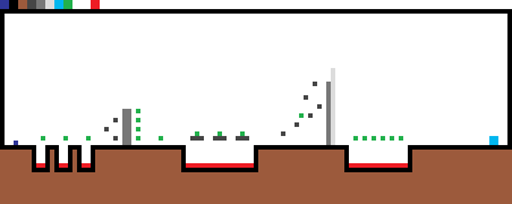
(click the picture for a 5x enlarged version)
I have to say that c#/.net 3.5 is a wonderful combination for creating applications quickly!
Lesson learned: Sometimes it is better to create (and eat) your own dogfood 🙂
At the moment, all the menu text in the game is stored in separated images – one for every menu item. For example, this is the “New Game” button:

Of course, storing each menu item as a separate picture is not very efficient, so I decided to add text rendering capability to the game.
My first choice was the OGLFT library. It’s a really easy to use and complete OpenGL text rendering library based on FreeType. I quickly added it to the project, and it worked perfectly, until I closed the application and got a nice “Access violation” exception 🙁
After hours of tinkering, I finally found out that the error was related to the FreeType library. For some mysterious reason, just trying to open a font file with FreeType caused the erroneous behavior.
So, since I couldn’t use FreeType, I decided to create a text rendering class myself, based on the font texture approach.
In order to create suitable font maps, I modified Irrlicht Font Maker to create non-irrlicht-specific font maps. I also added a couple of options and the ability to export the control points as custom text or in a handy binary format:
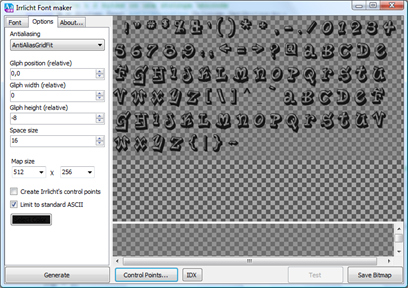
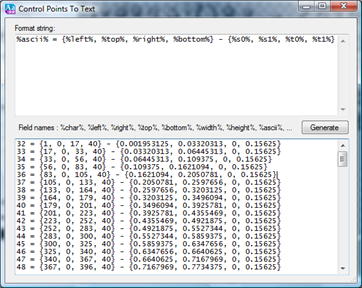
But that’s only the first part of the story: once ready, I took my new text rendering class for a test drive and, with much surprise, I discovered that the program triggered the same exception it did before! OH MY!
After an hour or so of debugging, I finally found out the root cause of the problem: a single call to fopen to read the font control points was enough to send the program to C++ hell.
I have since replaced all the standard C file IO functions (fopen, fread, …) with the modern C++ equivalent (fstream) and now the program ends with no errors.
In the end, I’m happy with the new font rendering method, as it gave me a chance to clean up and improve Irrlicht Font Maker, however once again I feel like I misplaced my foot in the minefield that is programming in C++ 🙂
In my previous article, Getting rid of the Naming Container in asp.net 2.0, I explained a method to override the extended naming functionality provided by ASP.net in order to create client-side controls with better IDs.
I was however informed in the comments that by overriding the NamingContainer property the control loses the ability to read its value from the PostBack data.
Since the controls I developed were not meant to to be used in a postback scenario, this wasn’t a big problem for me.
Fast-forward a couple of years and here I am, wondering why post back does not work in one of my projects 😉
Anyway, I looked at the link provided by Alex, where Rick Strahl talks about overriding the ClientId and the UniqueId properties instead of NamingContainer.
In a standard web control, the two properties ClientID and UniqueID are mapped, respectively, to the id and name properties of the HTML control generated.
Since most (all? ) JS frameworks use the id property to access the varius HTML elements and the PostBack mechanism uses the name property, I think the “best of both worlds” solution is to only override the ClientId:
public class NiceTextBox : System.Web.UI.WebControls.TextBox
{
    public bool UseNamingContainer { get; set; }

    public override string ClientID
    {
        get
        {
            if (this.UseNamingContainer)
                return base.ClientID;
            else
                return this.ID;
        }
    }
}
Now our NiceTextBox works even during post-back scenarios 🙂
Here is an early screenshot from the game I’m working on. Obviously all the programmer art you see is temporary and will be replaced by something better 🙂
…and I’m going to document the whole process on this blog 🙂
It will be a 2D mario-style platformer, whith a twist: the game is set on a physically realistic world. More details to come soon!
I also have a very cool productivity (“serious”) application to release. Testing is complete, I just need to get the boring part done (creating setups, writing web pages…).
